

 odel Builder for Microsoft® Excel®
Model Builder for Excel
| Model Builder - Panel | |||
|
This option makes it possible to insert some of the most commonly used Excel symbols, some of which can be accessed by using key combinations. |
By means of this function you will be able to realize about the use of the styles for your workbooks with the possibility of modifying or saving the styles. |
||
| Iterative tools | |||
|
Change the format of your numbers using the Format Currency tool . Click many times to see other types of number formats. |
Change the format of your numbers using the Format Number tool . Click many times to see other types of number formats. |
||
|
Change the format of your numbers using the Format percentage tool . Click many times to see other types of number formats. |
Change the date formats easily using the Format Date tool . Click many times to see other types of date formats. |
||
|
Using the Apply Formatting Options tool to use and save your own format settings. |
Select a cell and press this button many times to see the different format settings you selected. |
||
|
In order to gain access to this tool, go to panel Quick styles and press the button And a dialogue settings box will be displayed |
Use Unhide/hide Rows to unhide/hide rows with a simple click. |
||
|
In order to gain access to this tool, go to panel Quick styles and press the button And a dialogue settings box will be displayed. |
Use Unhide/hide Columns to unhide/hide columns with a simple click. |
||
|
In order to gain access to this tool, go to panel Quick styles and press the button ... |
Select the cell or cell range to be highlighted and click the oval icon. Access this button from the General Tools toolbar. |
||
|
With this function you will be able to place a super numeric index at the beginning of a text. |
With this function you will be able to place a super numeric index at the end of a text. |
||
| Quick edit | |||
|
Inserts the number of rows selected. |
Inserts the number of columns selected. |
||
|
Deletes the number of rows selected. |
Deletes the number of columns selected. |
||
|
This tool copies all values / formulas, from one row, going down... Until it finds the first empty cell in the cell below to the left. |
This tool copies all values / formulas, from one column, towards the right... Until it finds the first empty cell in the cell above. |
||
|
This tool quickly fills a selected range with the data found in the first row / column / cell, respectively. |
Some times we want to select only the first row or first column of a specific range, but when it is too extensive, this task is very hard to accomplish. |
||
|
This option copies all the formats of a given range / cell, to another range, as indicated. |
This function copies formulas from one range to another. |
||
|
This function copies values from one range to another. |
This tool will find and format the following kinds of cells. |
||
| Quick edit2 | |||
Many times we wish to change or add a formula to a value or to a cell, or part of another formula... |
You may want to do some math only with selected cells in the active worksheet. |
||
|
This tool transposes the data selected in the indicated range. |
You can change a formula's reference style. |
||
|
Excel, when copying formulas, does it with relative references, so the formulas change. |
This useful tool allows you to change the sign of a range or cell containing formulas or values. |
||
|
With this tool you will be able to modify in your formula the references towards a determined |
This tool allows you to interchange data contained in two ranges, in a simple manner... |
||
|
This useful tool allows you to paste a cell range to get linked to the original range. |
Customize cell alignment to right or to the left with this tool |
||
| Formulas [ Fx ] | |||
|
This useful tool makes it possible to cut a range of cells containing values and formulas; to then paste it to another area, but only as values. |
This interesting tool permits the interchanging of values of a selected range. |
||
|
Whenever we apply the percentage format to a range, using the tool available in Excel, we notice that the ... |
It is often the case that we wish to convert numeric values into text, to then perform certain calculations using the same values which have been converted to text. |
||
|
This useful tool converts all formulas of a selected range into values, in the simplest possible way: a single click. |
This tool selects cells of a given range, but only taking into account those with a given format. Consider the following example ... |
||
|
Remove text from the left or the right. Also you could add text from the beginning ot the end. |
Use the Add Text as Number Format to have numbers with letters combinations. |
||
|
Can you imagine how useful it would be to have a dialogue box that would allow you to perform on the spot calculations? |
This useful tool detects whenever one enters data that will cause an error in the formula. |
||
|
Get exponents written with this tool, either at the beginning or at the end of a stream of characters. |
|||
| Wizards [ W ] - Analytical tables | |||
|
Use this gainful tool to search all cells in a specific range with a particular background color and to do some math with the results. |
This useful tool performs mathematical calculations (adding, counting, finding highest, etc.), using cells that meet a given criteria (greater than, less than, equal to, etc.).... |
||
After having entered the data required by the dialogue box, we can save this model for future needs. |
After having entered the data required by the dialogue box, we can save this model for future needs. |
||
|
Use this practical tool to categorize records in a database, based on a category table. |
Multiple conditional analysis & formatting is the tool suitable to format cells in a database based on a criterion previously specified in the decision table... |
||
|
Conditional Text is the tool suitable to format cells in a range/database based on a criterion previously specified... |
|||
| Wizards [ W ] - Consolidation tools | |||
|
This useful tool allows you to make in a simple way, many arithmetic operations at the same time between spreadsheets. |
This useful tool makes easy the process of to consolidate information proceeding from ... |
||
|
This type of consolidation is appropriated if you want to see the detail along with the totals Let's illustrate this ... |
The cell or range that you want to change is called: Define the cell/range to change . This item must always contains a formula or a function... |
||
|
Let's build a breakeven (no earnings nor losses) of a specific business. |
Execute all models we may have previously saved with any of the following tools: |
||
|
This practical tool allows you to find the weighted average of a set of values. |
This useful tool allows you to sum and count data regarding to conditions specified in a criteria table... |
||
|
In order to understand the SUMIF option functionality, Think about the following situation.... |
In this case, we have a table with the names and the score of each one of them, also a criteria table. |
||
|
Do you wish to join text of many cells to a single cell? |
This is a very useful tool. You can use to get/refer the value in a cell in terms of its location relative to another one. |
||
|
Wizard intersect is the tool that searches for a table's intersections. |
Have you ever tried to build a formula containing several embedded IFs? Complicated, right? |
||
|
Quick fill is the tool that allows you to fill ranges with consecutive values, in a simple manner. Let us see an illustrative example ... |
|||
| Audit - Analysis | |||
|
This tool allows us to make graphical comparisons In a twinkle, about data series, using charts. |
This tool enables us to view formulas in a different, friendlier manner. |
||
|
This tool allows you to perform a series of operations with the named ranges. |
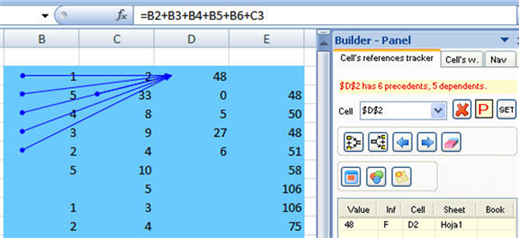
Many times we would like to determine the origin of each of the cells forming part of a formula.... |
||
|
This tool is meant to make up for the errors of Excel's Trace Error tool. |
This tool was designed to track circular references. |
||
|
This useful tool allows you to perform a variety of operations with the external and internal links with a ... |
With this tool you will be able to make comparison of formulas and values of the datas of a range. |
||
|
This is a useful tool that has been designed to make searching in a data range both simple and efficient. |
The selected range is automatically detected as the search range. If that is not the range to be searched, you may choose another ... |
||
|
1. Include the active cell in the range to be searched. |
Click on the Easy Search button in the toolbar. |
||
| Miscelanea | |||
|
This tool shows all origin links which may exist between formulas of a selected range. |
This tool shows any and all dependence links which may exist between formulas of a selected range... |
||
|
This tool bar option erases all origin and/or dependence link arrows from the active sheet... |
This versatile tool allows you to navigate between the cells which originate and/or depend on a ... |
||
|
Workbooks are often very extensive –and sometimes you will be interested only in checking the value of certain cells. |
This versatile tool allows you to navigate between the cells which originate and/or depend on a cell under observation. |
||
|
Do you need to select important cells in your model? Use this powerful tool to select and manage them. |
Do you need to select important cells in your model? Use this powerful tool to select and manage them. |
||
|
This utility as it´s name indicates, allows us to analize in a specific range, a group of formulas and all the..... |
|||
| Document | |||
Unlike Excel, which only eliminates comments from the active cell, this tool allows you to ..... |
Displays any comments hidden in the selected range. |
||
|
This tool allows us to change the comments background color. |
With this function you can manage workbook’s comments. |
||
|
Adds a new comment to the active cell. |
|||
| Document - Tools settings | |||
|
There are two option buttons in the Camera Tools frame: Excel's image and Dynamic. |
Use this tool to apply format of currency to a range of cells. |
||
|
Change the format of your numbers using the Format Number tool . Click many times to see other types of number formats. |
Change the format of your numbers using the Format percentage tool . Click many times to see other types of number formats. |
||
|
Change the date formats easily using the Format Date tool . Click many times to see other types of date formats. |
This tool is specially convenient if you want to navigate throughout databases with records or fields stretching beyond the screen. |
||
|
Use Set alarm to receive a reminder if you have a meeting or need to do something special. |
This tool will allow you to change Excel's color palette, making it possible for you to have fresh colors with a more professional and personalized tone. |
||
|
You can copy the customized colors from another open book. |
This useful arithmetical calculator, in addition to performing the most common calculations, makes it possible for us to copy data from a cell in the active sheet. |
||
|
This small but very useful tool bar makes it possible to create arrays in the simplest possible manner. |
|||
| Charts - labels - Images | |||
|
Allows visualizing the graphics in the active book. |
Add labels to your charts with this tool, either to them all or to selected ones. |
||
|
Use this tool to move the labels already posted in a chart. |
Add images to series points in your charts with this tool. |
||
|
Resize your charts with this tool –e.g. make them all the same size |
This tool allows you to export as an image any part or section of the spreadsheet that you previously selected. |
||
|
The following example shows how to use Copy & Paste chart format tool. |
To save a model select a graphic, place a name and description and finally click on the "Save chart's formats" button. |
||
| Tools | |||
|
Resize your charts with this tool –e.g. make them all the same size |
Your workbooks have so many sheets you find it hard to manage them? |
||
|
This tool makes printing and previewing Areas, Charts, Views easier ... |
We often lose valuable time doing repetitive tasks -if, for example, we want to hide the headings in several sheets of the Workbook ... |
||
|
We sometimes work with models whose information does not fit in the screen. And we may get lost as we navigate throughout the spreadsheet as the headings ... |
Do you wish to browse several workbooks at the same time? |
||
| Document | |||
|
If you are using MS Excel, you add the document to the recent MS Excel list ... |
Select the options you want to clear and press the OK button. Clean History is available using the Fast Close ... |
||
|
Use the Fast close Button to save/close open workbooks with a single click. Save your work if you have a meeting immediately!!! |
Workbook to Show: Select a workbook to show when the Fast Close Button is chosen. |
||
This extremely useful option allows - in a single click - to recalculate all workbooks opened. |
Managing your open workbooks is made easy with the Workbook manager tool. |
||
|
You can add and/or remove the cells you wish to and from the Model Navigator dialog as follows... |
Do you need to manage many folders, workbooks and worksheets in one place? Use this powerful tool to select and manage them all. |
||
|
With this tool you will be able to check the progress of your projects. |
This useful tool allows you to manage any pending tasks related to a given workbook that may be key to your projects, in an ordered manner ... |
||
|
Use Password list to view/add/delete/edit your password for MS Excel and MS Word files. |
Use Protection Configuration to add different types of passwords protection to your file. |
||




PRODUCTOS
Model building & Analysis tools
- Model Assistant Suite
- Model Analyzer for Excel
- Dashboard Tools for Excel
- Model Builder for Excel
- Spreadsheet Auditor for Excel
Otras herramientas de Análisis
- Consolidator Enterprise for Excel
- Goal Seeker for Excel
- Spreadsheet Consolidator for Excel
- What if Analysis Manager
- Multi Scenarios Manager for Excel
- Conditional Formatting for Excel
Bases de datos en Excel
Calculadoras Financieras
Funciones en línea
Otros
Terceros
Bundles
| Related Sponsors |